Types of extract
The four extract types Eebz runs, what each captures and when to use it.
An extract is a snapshot of product data read from a retailer's website. Eebz runs four types, each capturing different data.
Every retailer is read at the time it reprices, and the data is ready by 10am local time. If a read fails, Eebz never fills the gap with the previous day's figure: you only see what shoppers could see that day.
Product page extracts (PDP)
A product page extract captures a full snapshot of one product's page at one retailer. It is the standard extract behind most monitoring.
What it captures
- Price, original price and discount
- Availability
- Content: title, description and images
- Review score and count
- Promotion status and tags
- Seller and supplier
- Category and marketplace details
When it runs
The schedule follows the product's lifecycle stage. New Release and Catalogue products are read more often than Late Life and End of Life products. You don't need to trigger anything.
The raw page content is kept for 3 days for troubleshooting. The structured extract record is kept indefinitely.
Category and search extracts (PLP)
A category and search extract captures where a product sits in a retailer's category pages and search results. Product page extracts tell you what is on a product's page; these tell you where that page sits on the shelf. The app labels them PLP (product listing page).
What it captures
- Category rank
- Search rank for the search terms you choose
- Featured or sponsored placement in results
- Visibility across listing pages
When to use it
Use it to check your products appear where shoppers browse and search. It feeds the Discovery parameters in PerfectPage.
Store extracts
A store extract captures stock and price at each physical store for retailers with a store network, such as Currys, Argos and John Lewis.
What it captures
- Availability by store
- Price by store
- Stock quantity by store
- Store size and location
When to use it
Use it when you need to see how stock and price vary across a retailer's stores, not only online.
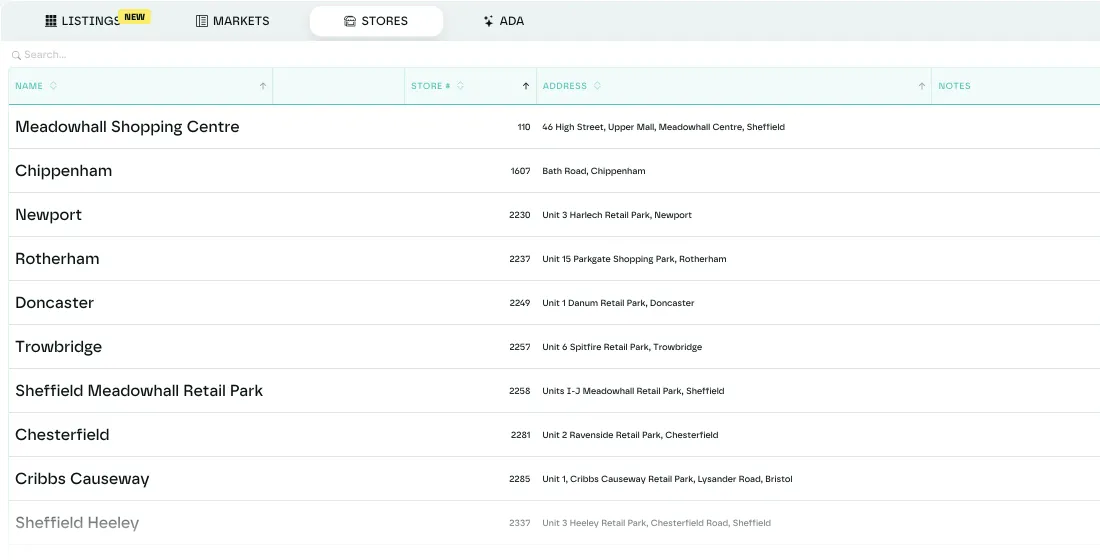
In the app, store data has its own Store tab on a listing: a sortable table of every location with its stock and price. Filter to in-stock stores only, and download the table as a CSV. Each retailer's Stores tab lists the stores Eebz covers.
Trade-in extracts (PTI)
A trade-in extract captures what a retailer will pay to buy a product back, by condition.
What it captures
- Grade A price (like new)
- Grade B price (good)
- Grade C price (fair)
- Grade D price (poor)
When to use it
Use it in categories with buyback programmes, such as consumer electronics and mobile phones, to track trade-in values alongside new prices.
A trade-in extract runs alongside a normal extract for the same listing and is processed separately.
Contract extracts capture subscription and contract pricing (device price, deposit, monthly price and contract length) for retailers that sell on contract.
Last updated October 2026