Lifecycle and importance
How a product's lifecycle stage and importance rating shape extracts, filters and the way Eebz assesses distribution.
Lifecycle and importance are two settings on each product. Lifecycle says where the product is in its commercial life. Importance says how widely retailers should stock it. Together they decide how often Eebz reads the product, how its listings are assessed and how you can filter it.
Lifecycle
You set two values on a product:
- Release date: when the product goes on sale
- Lifecycle duration (months): how long it stays active before retirement
Eebz works out the current stage from these:
| Stage | What it means |
|---|---|
| Pre-order | On pre-order, not yet shipping |
| New Release | Launch period: retailers should be restocking fast |
| Catalogue | Core sales period: major retailers usually reorder |
| Late Life | Mature: retailers are winding down reorders |
| End of Life | Some stock may remain, but retailers won't reorder, and extracts run less often |
| Retired | Probably off the shelf: extracts stop if it stays out of stock |
Where to set it
Click the lifecycle date in the Lifecycle section of the product's sidebar. A timeline shows the date each stage begins and how long the lifecycle runs.
Alongside the release date and lifecycle, you can record two dates for reference:
- Launch: when the product is publicly announced. It doesn't affect the lifecycle.
- List: when retailers should list the product. Set it to the release date if you don't want pre-orders.
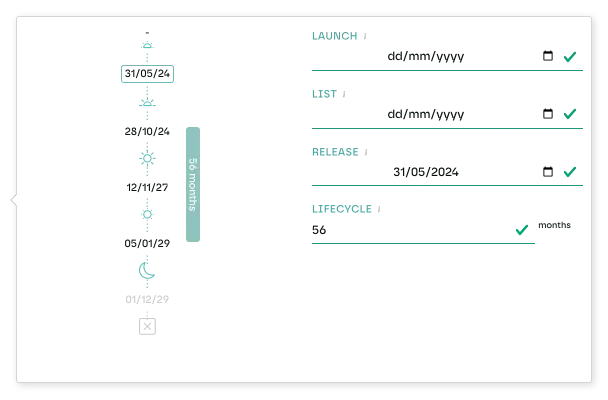
Lifecycle is a filter across the app: in listings, dashboard cards and Playground reports.
Effect on extracts
New Release and Catalogue products are read more often than Late Life and End of Life products, so collection winds down as a product does. See types of extract.
Importance
Importance, also called ranging, is how broadly you expect retailers to stock a product. It has five ratings:
| Rating | Meaning |
|---|---|
| AAA | Every retailer should stock it |
| AA | Most major retailers should stock it |
| A | Many retailers should stock it |
| B | Some retailers should stock it |
| C | Only specialist retailers should stock it |
The app shows importance as stars, from five for AAA to one for C.
Where to set it
Set importance in the Lifecycle / Assortment Strategy section of the product's sidebar. You can also set it per SKU. A SKU without its own rating takes the product's.
What it changes
- Availability: some availability figures need importance set before they show.
- Filtering: filter by importance in dashboard cards, listings and Playground reports.
- Listing assessment: Eebz uses importance to judge whether a product's spread across retailers is what you would expect.
How they work together
Eebz assesses each listing from three things:
- The product's lifecycle stage
- The product's importance rating
- The retailer's category strategy for that type of product
An AAA product in its Catalogue stage should be stocked by nearly every retailer, so a gap is flagged. Rate the same product C and finding it at a handful of specialists is expected, so nothing is flagged.
That way an out-of-stock is judged in context, not treated the same everywhere.
Last updated October 2026