PerfectPage
Switch on PerfectPage, set your own scoring standard and find the product pages that fall short.
PerfectPage™ Product Content scores each of your product pages, at every retailer, from 0 to 100% against a standard you set. Pages below your target score are flagged, so you know where to start.
Switch on PerfectPage
PerfectPage is switched on per product, from Products › Our products, with the PerfectPage toggle on the product's row. It uses points from your subscription, and once on it stays on for 30 days.
How the score works
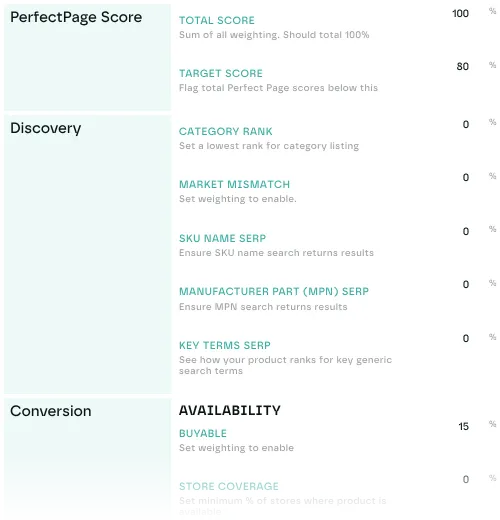
The score is a weighted combination of parameters in three groups.
Discovery
How easily shoppers find the product through retailer search and category pages.
- Category Rank: is the product in the top positions of the category page?
- Market Mismatch: does the retailer's category match the market you expect?
- SKU Name Search: does a search for the SKU name bring up the product near the top?
- MPN Search: does a search for the manufacturer part number find it?
- Key Terms Search: how does it rank for general category search terms?
Conversion
The content and data that turn browsers into buyers.
- Availability: can shoppers buy it online, and what share of stores stock it?
- Default SKU: is your SKU the one shown first on a page that lists several?
- Page Title: does the retailer's title follow your SKU naming?
- Brand: is the right brand shown?
- Description: is it within your minimum and maximum length?
- Keywords: are your chosen keywords on the page?
- Featured Content: is enhanced content, such as A+, present?
- Product Specs: are specifications listed and correct?
- GTIN & MPN: are the right identifiers on the listing?
- Reviews: are there enough reviews, and is the rating above your threshold?
- Images: are there enough, do they match your product, and are their size and dimensions right?
- Video: is there video on the page?
- Buy Box: is an authorised seller winning the Amazon Buy Box?
- Cross-sell: does at least one of your products appear in the cross-sell section?
Retail Media
How well paid placement is being used.
- Promoted: is the product promoted at retailers that offer promotion?
- Unnecessary Promotion: is it promoted while already ranking near the top organically?
- Unavailable Promotion: is it promoted while it can't be bought?
Set your standard
Go to Settings › Organisation › KPIs › PerfectPage and set:
- Target score: the score a page needs to pass, for example 80%. Pages below it show in red.
- Weights: how much each parameter counts. Weights must total 100%, or no score is calculated.
- Thresholds: the value each parameter is checked against, such as at least 4 images, a description of 200 to 1,000 characters, or a review score above 80%.
Click a parameter's name to open its thresholds. Each field saves when you leave it.
See the results
On the dashboard
Add a PerfectPage card for an overall score and a breakdown across your products. Filter the card by retailer, market or product. See dashboard cards.
In a retailer's listings
Add the PerfectPage Score column, and a pass or fail column for any parameter, to a retailer's listings. Every listing in the category is scored, competitors included, with the score circled against your target.

On a listing
Open any listing. The PerfectPage section shows:
- The overall score, pass or fail
- The score for each group: Discovery, Conversion and Retail Media
- Each parameter's score with the data behind it: the images, the keywords found and missing, the review count and so on
In reports
Build a PerfectPage report across any mix of products, retailers and markets in the Playground. Each parameter is available as a column.
Find the pages to fix
In listings, filter by PerfectPage exceptions to show only the pages with a given problem, such as too few images or missing keywords. That lets you work through a large range one fix at a time.
Last updated October 2026