Reports Playground
Build, save, share and export custom reports with the Playground report builder.
The Playground is the custom report builder. You choose what to group by, what to measure and which data to include, and the Playground builds the table.
Get started
Click Playground in the main menu to see your saved reports, then + Add to create one.
Build a report
A report has four parts.
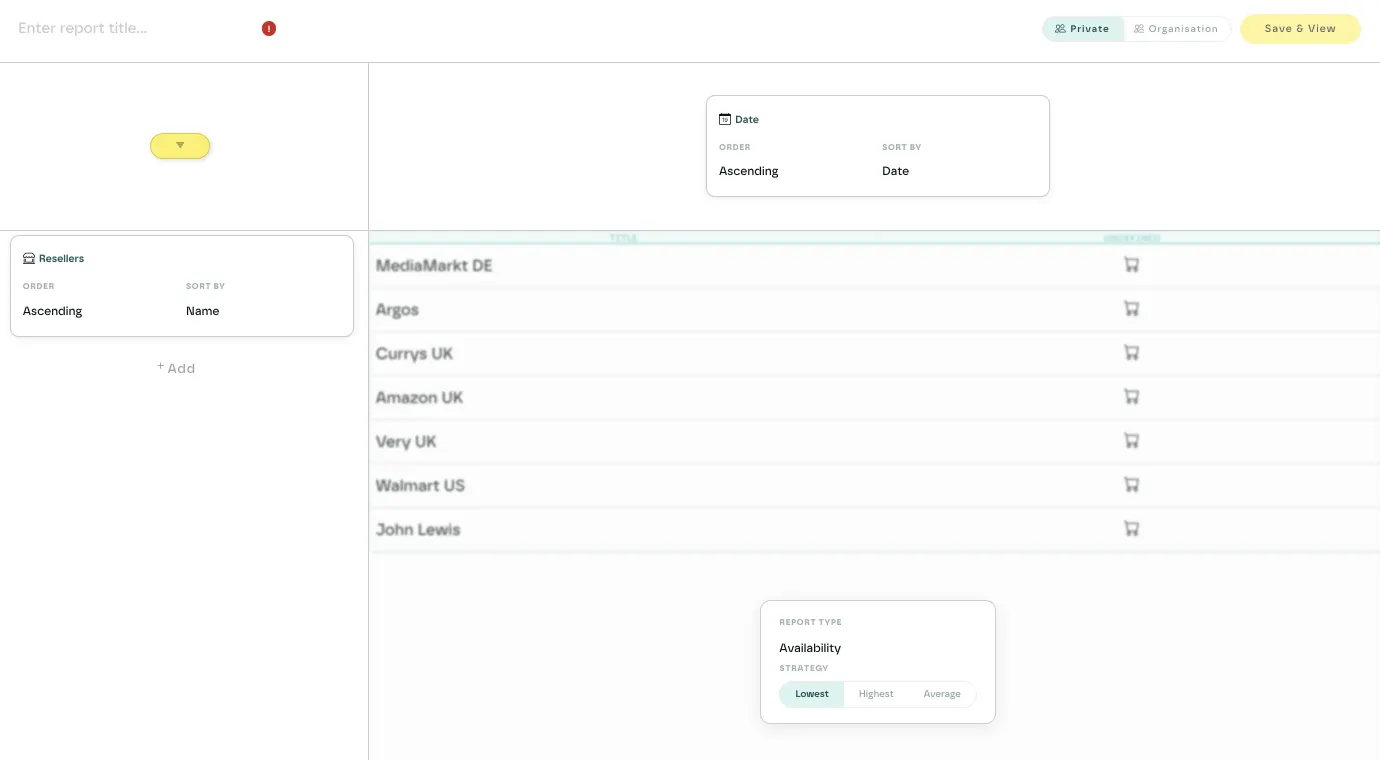
Rows
Rows group the data down the page. Add as many row dimensions as you need and drag them to reorder. Options include:
- Markets, territories, retailers and retailer owners
- Products, SKUs, packaging and brands
- PerfectPage metrics (with the Overall Score metric only)
Sort each row by name or value, ascending or descending.
Columns
Columns group the data across the page. Choose one:
- Date, with a column per period: live, weekly or daily
- Product, retailer, SKU or territory, with a column per item
Metric
Choose what to measure from the list above the preview table:
- Availability: in-stock status
- Pricing: prices, with optional currency and range colouring
- Rankings: category and search rank
- Reviews: score and count
- PerfectPage: each PerfectPage parameter
For most metrics you also choose how to combine matching listings: lowest, highest or average.
Filters
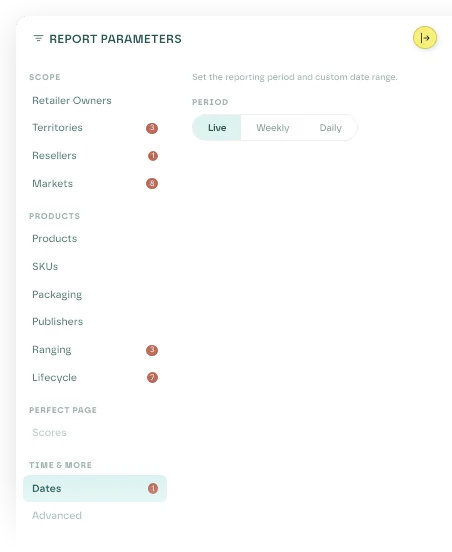
Click the filter button at the top left of the builder to open the report parameters. They are grouped into Scope (retailer owners, territories, retailers and markets), Products (products, SKUs, packaging, brands, ranging and lifecycle), PerfectPage and Time & more (dates and advanced options).
Live preview
A preview table on the right updates as you build, using a sample of your data, so you can check the report before you save it.
Save and share
Name the report and choose who sees it:
- Private: only you
- Organisation: everyone in your organisation
Click Save & View to save and open the full report. The creator and admins can edit it from the settings icon.
View and export
The report view formats each metric for reading: availability icons, colour-coded prices, PerfectPage scores as percentages. Click any value to open that listing.
At the top right:
- Download CSV exports the full report.
- Share emails a link to the report. Recipients need an Eebz login to open it.
Tips
- Some row dimensions can't be combined, and the Playground stops you choosing them.
- Removing a column clears the filters that depended on it. Removing the Date column clears your date filter.
- Everyone in your organisation can see an organisation report, but only its creator or an admin can edit it.
To send a report on a schedule, set up a Playground report in Ada.
Last updated October 2026