How filters work
Open the filter panel, combine filters and understand which filters depend on or exclude each other.
Filters narrow the data in reports, listings, products and other parts of the app. Combine them to get exactly the view you need.
Open the filter panel
Click the filter icon (the funnel) at the top of any page that supports filtering. A panel opens on the right, with your active filters on the left and the filters you can add on the right.
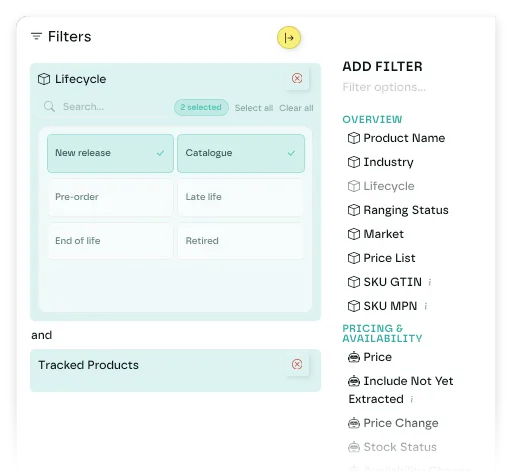
Add and remove filters
Click a filter's name in the Add Filter list. It appears as a card under Active Filters, open for editing.
To remove a filter, click the delete icon at the top right of its card.
Filter types
- Multiselect: choose one or more values from a list, such as retailers, products or markets. Select All is available.
- Toggle pills: click buttons on or off, such as lifecycle status, ranging status or importance.
- Date: pick a preset period (last 7 days, last 30 days, last quarter and others) or a custom range.
- Range: enter a minimum and a maximum. Leave either blank to set only one limit.
- Text search: type, then click a result to select it.
How filters combine
Several values in one filter match any of them. Three retailers in the retailer filter returns items from any of the three.
Several different filters must all match. A retailer filter and a date filter return only items that meet both. An and between the filter cards shows this.
Dependent filters
Some filters need another filter first:
- SKU Attributes needs a product.
- Attribute Values needs attribute IDs.
If a filter is greyed out in the Add Filter list, check that its prerequisite is set. Removing a filter also clears any filters that depend on it.
Filters that can't be combined
- SKU List, SKUs and SKU Attributes: only one at a time.
- Product and Publisher (brand).
- Territory and Retailer Owner.
Filter count
A badge on the filter icon shows how many filters are active on the page.
Last updated October 2026