Report types
What each report type measures, which ones depend on your plan, and the rules for PerfectPage, currency and strategy.
The report type is what each cell in the report measures. Choose it from the Report type card below the preview table.
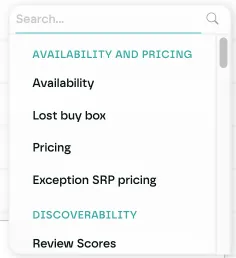
All report types
Availability and Pricing
- Availability: whether the product is in stock
- Lost buy box: listings that have lost the buy box
- Pricing: the price
- Exception SRP pricing: prices that break your SRP
Discoverability
- Review Scores: the average review score
- Count reviews: the number of reviews
Conversion
- Category rank: the product's rank in its category
- Tag: the tags on the listing
- Voucher: the vouchers on the listing
PerfectPage
- Overall score: the overall PerfectPage score
- One type per PerfectPage parameter: Specifications, Brand Match, Market Mismatch, Default SKU, Description Length, Featured Content, Image Count, Image Dimensions, Image Match, Promoted in Category, Keywords, Buy Box Winner, Unnecessary Promotion, Category Rank, Product Title Match, Review Count, Review Score, Available, Store Coverage, Out-of-Stock Promotion, Video, MPN SERP, Search Term Rank, Image Quality, Product Offer, GTIN and MPN
To learn what each PerfectPage parameter checks, see PerfectPage.
Types that depend on your plan
- Review Scores and Count reviews need Discovery or PerfectPage on your plan.
- Category rank needs PerfectPage.
If your plan doesn't include them, they appear greyed out in the list.
Strategy
When several listings match one cell, Strategy decides which value to show: Lowest, Highest or Average. It appears for every report type.
Currency
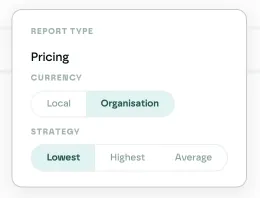
Currency only appears for Pricing:
- Local shows each price in the retailer's own currency.
- Organisation converts every price to your organisation's currency.
Exception SRP pricing is always shown in local currency.
PerfectPage scores
Overall score is the only type that works with a PerfectPage Metrics row. If you change the report type, the PerfectPage Metrics row and its score filters are removed.
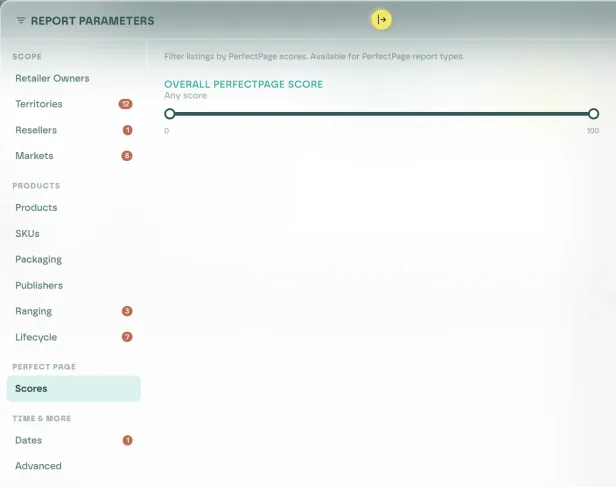
The Scores filter tab only turns on for PerfectPage report types:
- Overall score filters by a score range from 0 to 100.
- A single parameter filters by All, Complying or Exceptions.
Sorting by value
Rows can sort by Value, but this has no effect for Availability, Lost buy box, Tag and Voucher, because their cells aren't numbers. Those rows sort by name instead.
Last updated